
As engineers in the current AI-driven development era, it is easy to build something flashy with attractive colors and animations everywhere. Even a feature that would have taken two days to develop can now be built within hours. What a productive day! We’ve all felt that.
But the cracks start to show in production when, on a particular day, you have more visitors than you normally would. Before anything else starts to break, your immediate solution is often to scale up.
There can be multiple reasons for these sudden failures. Maybe the application server was not optimized well, web workers were starved of resources, poor error handling in a scheduler leaked into the request cycle, or any number of other issues. Among all of these, one of the primary causes is often the database itself, either because it was never tested against the load it received, or because a particular query is choking it under pressure.
We all learn database concepts through our curriculum, but their practical application is often overlooked, especially early in our development careers. I did the same.
It was only while working on critical software systems that I truly understood the importance of database queries and why indexes matter. While indexing is not the only factor that affects performance, it is certainly one of the most important. I have seen a query that took nearly 4 seconds to execute drop to just 2 milliseconds after applying the proper index.
With that in mind, it is important to understand what indexes are, when to use them, which type of index to choose, and most importantly, how to identify opportunities where an index can make a meaningful difference. To start with let us understand how database will index your data.
How Database Store Indexes
If you have worked with C or a similar programming language, you have probably come across pointers. While database indexes are not pointers in the traditional sense, the idea is somewhat similar—they help the database locate data more efficiently without scanning every row.
Think of an index like a phone book. If you want to find a person named “Smith”, you don’t start from the first page and read every entry. Instead, you jump directly to the section containing names that begin with “S” and continue your search from there.
Without an index, the database may have no efficient way to locate matching records and will often perform a full table scan, checking rows one by one until it finds the required data. The matching record could be on the 10th row or the 10,000th row, the database won’t know until it examines them.
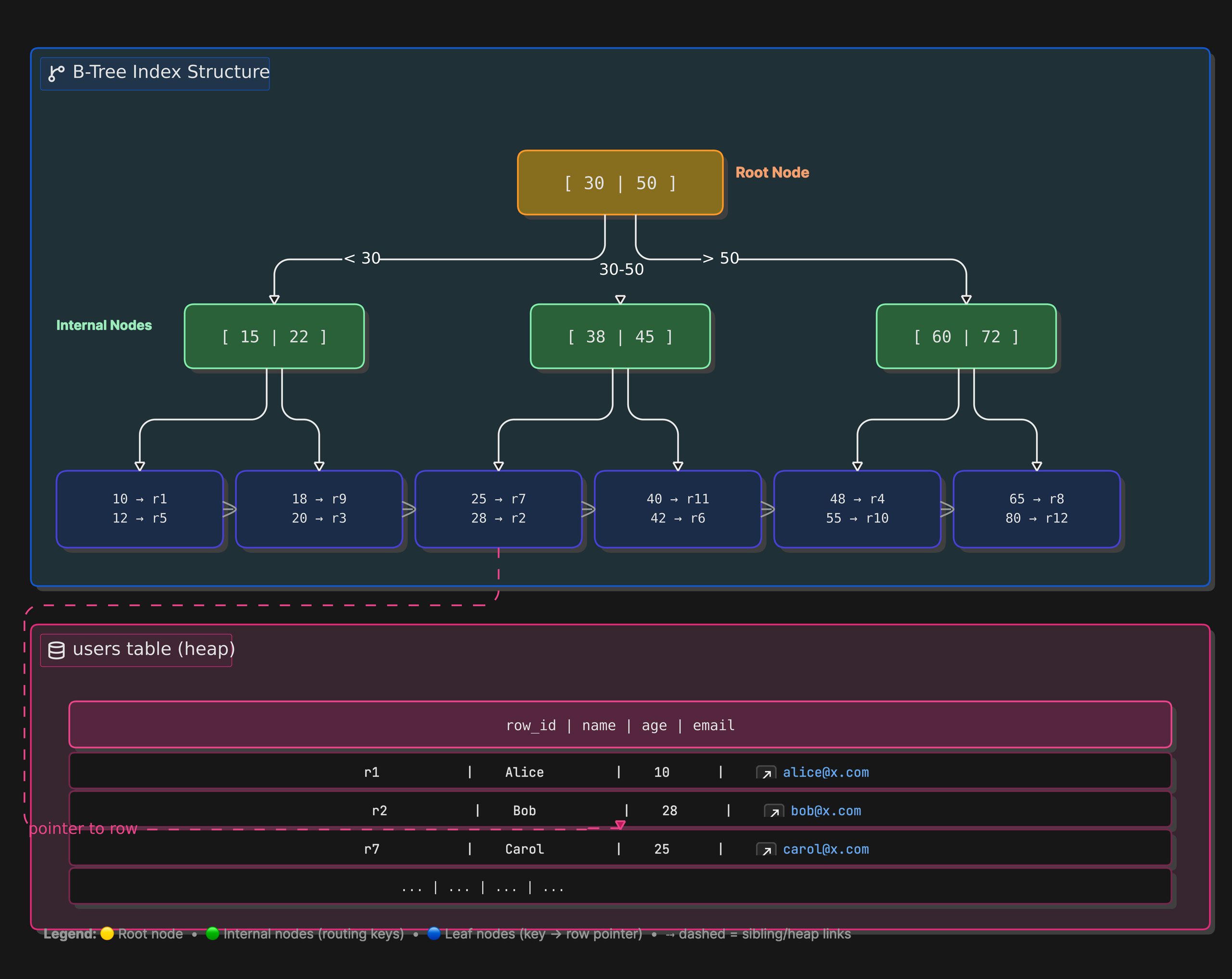
To avoid this, databases maintain separate index structures, typically using tree-based data structures such as B-Trees. These structures store indexed values in a sorted manner along with references to the actual table rows. When a query uses an indexed column, the database can traverse the index tree to quickly narrow down where the matching records are located, skipping large portions of data that cannot possibly satisfy the query.
When you index one of the table column, it is sorted and tree is generate for unique values as node and all the related columns are stored as leaf of that node.
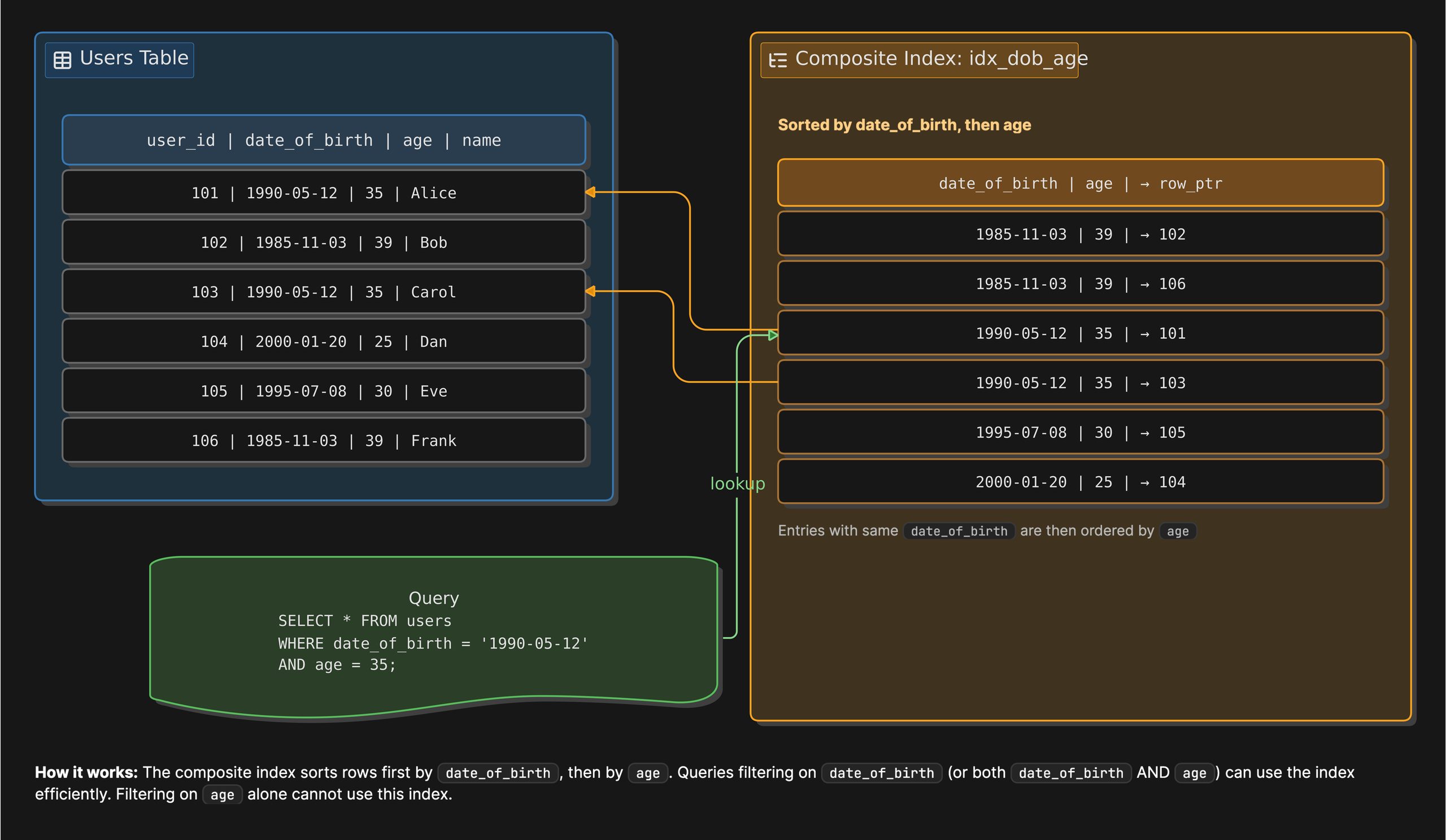
similarly, when you add composite index typically includes two or more column your data is sorted by the order in which you have defined the columns in index.
Write Cost Of Every Index
Going forward, we will use two identical tables for our examples. In one table, we will add indexes based on actual query patterns and performance analysis. The other table will be intentionally over-indexed, containing indexes for nearly every query our system might execute. Both tables will contain approximately 4 million rows of randomly generated user data.
Since we are discussing excessive indexing, it is important to understand the cost associated with it, commonly referred to as write cost. This is the trade-off you make to achieve faster reads. Every time a row is created, updated, or deleted, the database must also update all related indexes. As the number of indexes grows, so does the amount of work required for these write operations.
Indexes also consume disk space because they are stored separately from the table data. Therefore, when adding an index, you must consider not only the potential read performance gains but also the impact on write performance and storage usage. As we have table already with us let’s check the storage comparison of both tables.
SELECT
    TABLE_NAME,
    TABLE_ROWS,
    ROUND(DATA_LENGTH  / 1024 / 1024, 2) AS DATA_MB,
    ROUND(INDEX_LENGTH / 1024 / 1024, 2) AS INDEX_MB
FROM information_schema.TABLES
WHERE TABLE_SCHEMA = 'index_demo'
  AND TABLE_NAME IN ('users', 'users_over_indexed')
ORDER BY INDEX_MB DESC;
+--------------------+------------+---------+----------+
| TABLE_NAME | TABLE_ROWS | DATA_MB | INDEX_MB |
+--------------------+------------+---------+----------+
| users_over_indexed | 3841854 | 869.00 | 1622.69 |
| users | 3841854 | 869.00 | 0.00 |
+--------------------+------------+---------+----------+Here, one of the tables has an index size larger than the data itself. While this is not necessarily a problem on its own, it should prompt you to take a closer look at your indexes. You should identify which indexes are actually being used, how frequently they are used, and whether their cardinality justifies their existence.
In the following sections, we will examine each of these factors and apply them to our users table. By the end, we’ll compare the resulting index usage with our over-indexed table and see how a thoughtful indexing strategy differs from simply adding indexes everywhere.
Making Sure You Have the Right Index
When you are creating an index, you must consider a few things: cardinality, your query patterns, which queries are most critical, and the column order in composite indexes. Let’s start with the most important piece.
Cardinality
Cardinality is the number of distinct values in a column — the more distinct values, the better the index candidate. Take the gender column as an example. It contains only 3–4 unique values across 4 million rows, meaning even with an index the database still has to fetch roughly 1,000,000 rows per query — a full table scan is often cheaper. You can check the cardinality of indexes you have added with below query.
SELECT
    INDEX_NAME,
    COLUMN_NAME,
    CARDINALITY
FROM information_schema.STATISTICS
WHERE TABLE_SCHEMA = 'index_demo'
  AND TABLE_NAME   = 'users'
ORDER BY CARDINALITY ASC;
Query Pattern
Start by asking yourself a few questions whenever you write a SQL query:
- Is this a hot path — the most frequently executed query?
- Does the query has any
WHEREclause? - Am I filtering on a column that has high cardinality?
If you can answer the above question while looking at you query, you are already one step ahead with your query performance . Let’s take one example
MariaDB [index_demo]> EXPLAIN select * from users where date_of_birth = '1999-06-09' and gender ='female';
+------+-------------+-------+------+---------------+------+---------+------+---------+-------------+
| id   | select_type | table | type | possible_keys | key  | key_len | ref  | rows    | Extra       |
+------+-------------+-------+------+---------------+------+---------+------+---------+-------------+
|    1 | SIMPLE      | users | ALL  | NULL          | NULL | NULL    | NULL | 3841852 | Using where |
+------+-------------+-------+------+---------------+------+---------+------+---------+-------------+
Now add an index on date_of_birth (higher cardinality than gender):
CREATE INDEX idx_users_dob ON users (date_of_birth);+------+-------------+-------+------+---------------+---------------+---------+-------+------+-------------+
| id | select_type | table | type | possible_keys | key | key_len | ref | rows | Extra |
+------+-------------+-------+------+---------------+---------------+---------+-------+------+-------------+
| 1 | SIMPLE | users | ref | idx_users_dob | idx_users_dob | 4 | const | 206 | Using where |
+------+-------------+-------+------+---------------+---------------+---------+-------+------+-------------+Rows scanned dropped from 3.8 million to 206. That is what a well-chosen index does. With that whenever your run EXPLAIN on your query, it will help you to understand a lot more about your query, which will help you to improve it.
| Column | What to look for |
|---|---|
type | The join/scan type. ALL = full table scan (bad). ref, range, const = index is used (good). const is best — single row via unique index. |
possible_keys | Indexes the optimizer considered. NULL means no index was even a candidate. |
key | The index actually chosen. NULL means no index was used. |
key_len | Bytes used from the index. A composite index used partially will show a shorter key_len than the full index. |
rows | Optimizer’s estimate of rows it needs to examine. Lower is better. |
Extra | Additional notes. Using where = post-filter applied. Using index = index-only scan, no row lookup. Using filesort = extra sort pass, no index covering the ORDER BY. |
When Extra shows Using index, it means the database answered the query entirely from the index without ever touching the actual table rows — the most efficient outcome possible.
Composite Index
It is combination of 2 or more columns, and creating on it is important to place columns used with equality conditions (=) before columns used with range conditions (>, <, BETWEEN, LIKE 'prefix%'). This allows the database to narrow the search as much as possible before performing a range scan. Within the equality columns, more selective (higher-cardinality) columns are often good candidates to appear first.
let’s say you want to filter based on the status and creation date of users, without add any composite index DB will scan all the rows. Now to improve this we have two options:
- First filter on creation and then status.
- First filter on status and then creation.
EXPLAIN SELECT id, first_name, created_at
FROM users
WHERE status = 'active' AND created_at >= DATE_SUB(NOW(), INTERVAL 30 DAY) ORDER BY created_at DESC;
+------+-------------+-------+------+---------------+------+---------+------+---------+-----------------------------+
| id | select_type | table | type | possible_keys | key | key_len | ref | rows | Extra |
+------+-------------+-------+------+---------------+------+---------+------+---------+-----------------------------+
| 1 | SIMPLE | users | ALL | NULL | NULL | NULL | NULL | 3841850 | Using where; Using filesort |
+------+-------------+-------+------+---------------+------+---------+------+---------+-----------------------------+Based on column we can say the status column may not be high cardinality column, but when it is compared with range column, it can significantly reduce row scan.
CREATE INDEX idx_users_status_created ON users (status, created_at DESC);Now with same EXPLAIN query check, we have reduced the row scan dramatically.
+------+-------------+-------+-------+--------------------------+--------------------------+---------+------+-------+-------------+
| id   | select_type | table | type  | possible_keys            | key                      | key_len | ref  | rows  | Extra       |
+------+-------------+-------+-------+--------------------------+--------------------------+---------+------+-------+-------------+
|    1 | SIMPLE      | users | range | idx_users_status_created | idx_users_status_created | 88      | NULL | 58872 | Using where |
+------+-------------+-------+-------+--------------------------+--------------------------+---------+------+-------+-------------+
Indexes Are Trade-off
Adding indexes is not a one-time process; it is an ongoing maintenance task that helps keep your database healthy and your queries optimized.
As your application evolves, data volumes grow, new columns are added, and query patterns change. Over time, this can leave behind unused or rarely used indexes that continue to consume storage and add write overhead without providing much value.
While your infrastructure and database resources may already be carefully managed by your DevOps team to keep things running smoothly and avoid those unexpected Saturday night failures, indexing is something you must continuously revisit. Regularly reviewing index usage, removing redundant indexes, and adding new ones where needed is an important part of maintaining a performant database.